

Variables Tutorial
Walk through parametrizing a component configuration with variables end to end, using the API.
This tutorial will guide you through basic usage of Variables in the component configuration. The result will be the parametrized configuration of the Generic Extractor, but this approach can be applied to any component.
In the examples, we use the curl console tool to interact with our APIs.
Define API endpoints
Section titled “Define API endpoints”First, store the API endpoints as environment variables, so we don’t have to repeat ourselves.
We will need:
- Storage API to store the variable definitions and the extractor configuration.
- Job Queue API to run the extractor job from the configuration.
The host names depend on your stack:
export STORAGE_API_HOST="https://connection.keboola.com"export JOB_QUEUE_HOST="https://queue.keboola.com"Obtain Storage API Token
Section titled “Obtain Storage API Token”A Storage API Token is needed to interact with the Keboola APIs.
Obtain a Storage API token from the user interface of your project, see this Guide. The token must be allowed to manage component configurations — a read-only token fails at the create-configuration step.
Then store the token to the environment variable.
export TOKEN="..."Define variables
Section titled “Define variables”The next step is to define the variables in a Variable Configuration.
Define name and type of the variables.
export VARIABLE_CONFIG_NAME="Extractor variables"export VARIABLE_CONFIG='{ "variables": [ { "name": "outputBucket", "type": "string" }, { "name": "id", "type": "int" } ]}'Use Create Configuration API call to store variable configuration.
curl --include \ --request POST \ --header "Content-Type: application/x-www-form-urlencoded" \ --header "X-StorageApi-Token: $TOKEN" \ --data-urlencode "name=$VARIABLE_CONFIG_NAME" \ --data-urlencode "configuration=$VARIABLE_CONFIG" \"$STORAGE_API_HOST/v2/storage/components/keboola.variables/configs"Example API call result.
{ "id":"1234", "name":"Extractor variables", "description":"..."}Save variable configuration id from the the result to the environment variable.
export VARIABLE_CONFIG_ID="1234"The created variable configuration defines the names and types of variables.
Default values live in configuration rows of this same variable configuration, referenced from the
main configuration by variables_values_id — see Variable Values.
In this example, the values of the variables are entered directly to the run API call (see below), so configuration with the variable values is not used.
Create extractor configuration
Section titled “Create extractor configuration”Define extractor configuration with variables {{placeholders}}.
export COMPONENT_ID="ex-generic-v2"export EXTRACTOR_CONFIG_NAME="Extractor configuration"export EXTRACTOR_CONFIG='{ "parameters": { "api": { "baseUrl": "https://jsonplaceholder.typicode.com/" }, "config": { "debug": true, "outputBucket": "{{outputBucket}}", "jobs": [ { "endpoint": "posts/{{id}}/comments" } ] } }, "variables_id": "'$VARIABLE_CONFIG_ID'"}'Use Create Configuration API call to store extractor configuration.
curl --include \ --request POST \ --header "Content-Type: application/x-www-form-urlencoded" \ --header "X-StorageApi-Token: $TOKEN" \ --data-urlencode "name=$EXTRACTOR_CONFIG_NAME" \ --data-urlencode "configuration=$EXTRACTOR_CONFIG" \"$STORAGE_API_HOST/v2/storage/components/$COMPONENT_ID/configs"Example API call result.
{ "id":"4567", "name":"Extractor configuration", "description":"..."}Save extractor configuration id from the result to the environment variable.
export EXTRACTOR_CONFIG_ID="4567"Run extractor configuration
Section titled “Run extractor configuration”Define values of the variables. Both values are quoted — the API declares a variable value as a string.
export VARIABLES_VALUES='[ {"name": "outputBucket", "value": "my-bucket"}, {"name": "id", "value": "1"}]'In this example the values of the variables are part of the run job request.
For other ways to define values see the Variables documentation.
Use Run Job API call to run extractor configuration.
The body is passed on standard input, so the multi-line $VARIABLES_VALUES survives intact — inlining
it as '$VARIABLES_VALUES' makes bash split it on whitespace and truncates the request.
curl --include \ --request POST \ --header "Content-Type: application/json" \ --header "X-StorageApi-Token: $TOKEN" \ --data-binary @- \ "$JOB_QUEUE_HOST/jobs" <<EOF{ "component": "$COMPONENT_ID", "config": "$EXTRACTOR_CONFIG_ID", "mode": "run", "variableValuesData": { "values": $VARIABLES_VALUES }}EOFCheck the job result
Section titled “Check the job result”The run-job call returns a job object that includes its id and status. Poll the job by its ID to follow progress:
curl --header "X-StorageApi-Token: $TOKEN" \ "$JOB_QUEUE_HOST/jobs/{jobId}"The status progresses from processing to success when the job finishes (or error on failure, with details in the result field).
In the Keboola UI you can see the same job — in the picture below, the entered values of the variables were used.
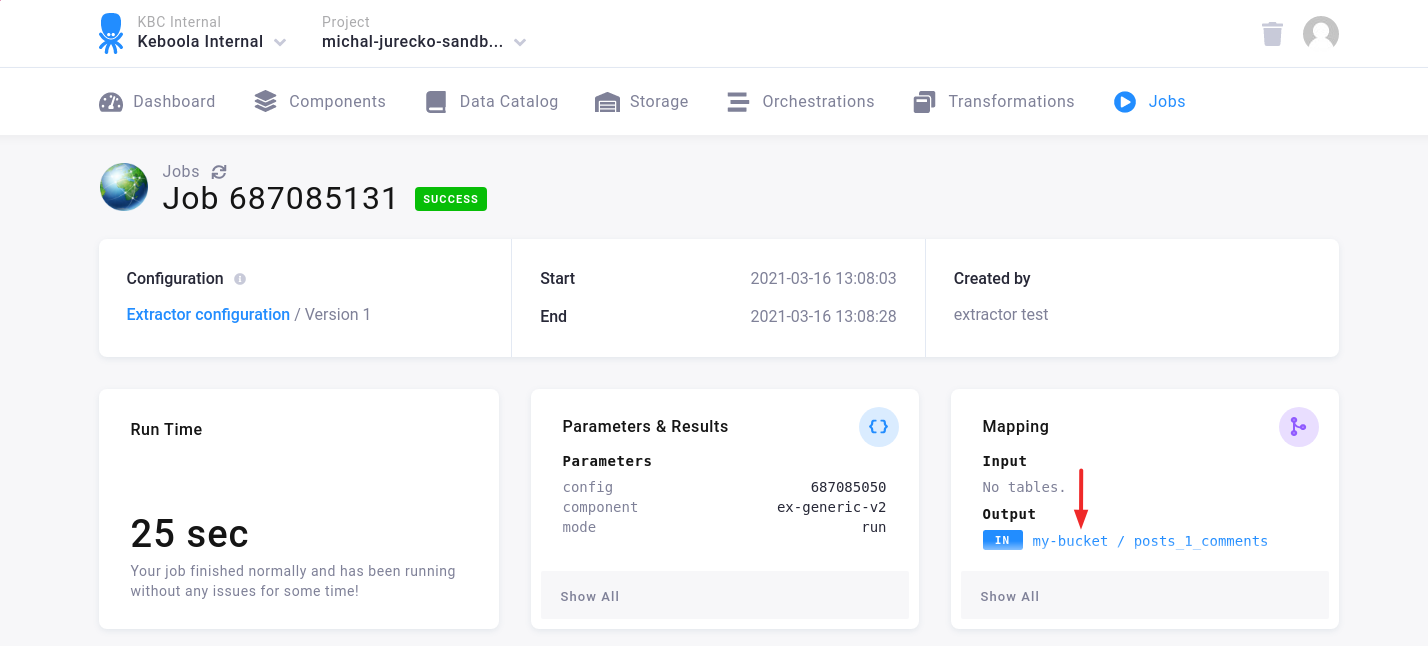
A note about the replaced variables is in the job logs.

See the Variables documentation for more information.